Windows, Telemetry and Other Foolishness #
Windows 11 now has AI (Copilot) in the Notepad executable by default. In my opinion that’s when things went too far.
Lucky there are some easy ways to clean up your Windows 11 setup with automated scripts. I have tried lots and lots of them, the most notable being Winaero Tweaker (Which shows its age a bit with Aero, which was a Vista addition) and Winutil by Youtuber Chris Titus. We’re going to focus on the latter.
You should never just blindly run scripts you find on Github. I would tell you to review the scripts that will be run but also notice that there are hundreds of maintainers on the GitHub Repo, and if something was nefarious in the code it would take some considerable collusion to achieve.
The latest version of the Winutil script can be pulled via a one-liner in an Admin powershell from the GitHub repo. It does not need to be installed, it just runs in a Powershell window.
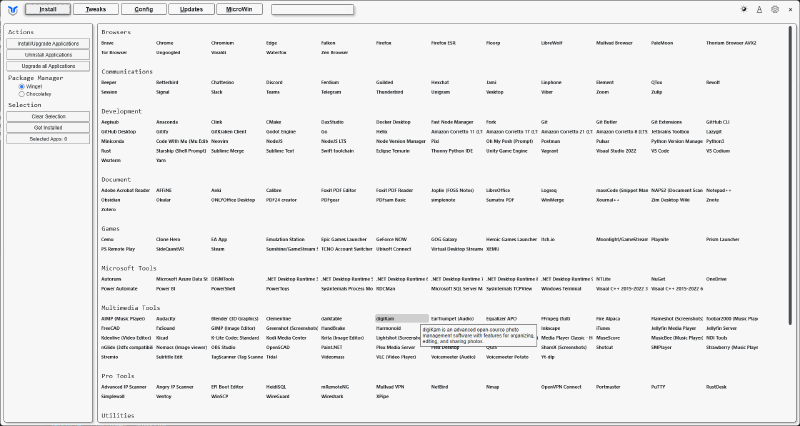
Once the tool loads, the main page can be used to install almost everything you could possibly want to install
Navigate over to the Tweaks Page (second tab along top ribbon)
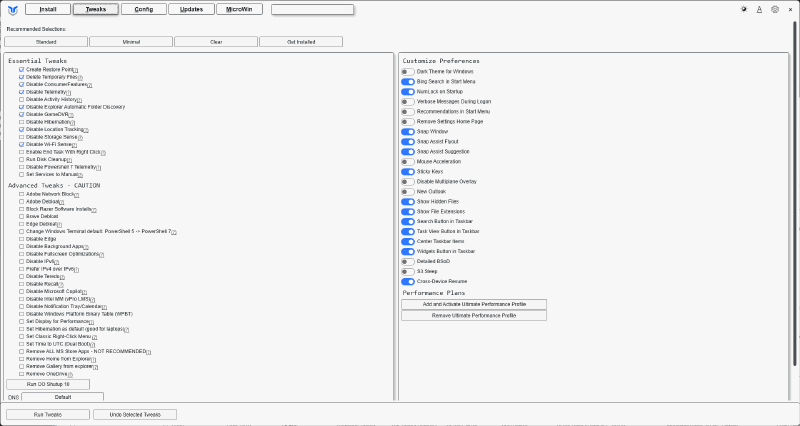
You should also be taking backups of your computer (whatever way you want) and I’d suggest taking a good full baremetal backup before going too wild with more concerning tweaks.
Conclusion #
I am almost exclusively on Linux these days. My main workhorse desktop is still on Windows, mostly due to the fact I have 6 screens and trying to run them all on Linux is likely a fool’s errand.
Getting rid of Telemetry and some of the other similar items with the Winutil has allowed me to rest a bit easier that papa Microsoft doesn’t know everything I click on 24/7.
As they said in the movie Anon (2018), “It’s not that I have something to hide. I have nothing I want you to see.”